When a Custom AI-Built App Beats Another SaaS Subscription
By Carlos Borlaza · · 7 min read
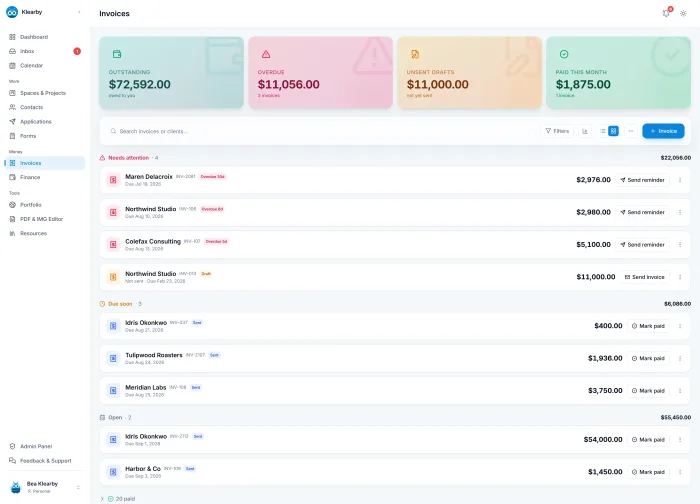
Most small businesses run on a stack of subscriptions: one tool for invoices, one for projects, one for forms, one for the calendar. Each is good at its job. Together they barely talk to each other, so someone spends their week copying data between them.
That was the problem I set out to solve with Klearby, an all-in-one business hub for virtual assistants, social media managers and freelancers. Building it taught me when a custom app is worth it, and when it is not.
Signs you have outgrown off-the-shelf tools
- The same data lives in three places and someone keeps it in sync by hand.
- A spreadsheet is doing a database's job, with rules everyone has to remember.
- You pay for several tools and use a small part of each.
- Your process has a step no tool supports, so it happens in email or someone's head.
- Staff in the field or on a phone struggle with tools built for a desktop.
One or two of these is normal. When most of them are true, the cost of the workarounds is usually higher than the subscriptions themselves, because it is paid in staff hours every week.
When you should not build
If an existing tool fits your process and the team actually uses it, keep it. A custom app has to be hosted, maintained and updated. Building makes sense when the fit is poor and the work is central to how you make money, not for a side process a cheap subscription handles fine.
What AI-assisted development changes
AI coding tools such as Claude Code and Codex now write much of the code in a modern build, which cuts the time and cost of custom software sharply. What they do not replace is deciding what to build, designing how the data fits together, and testing that it works when real people use it in real conditions.
That is where projects succeed or fail. A demo that works once is easy. An app a business can rely on needs the dull parts: permissions, retries, backups and tests.
What building Klearby taught me
Connect the data first
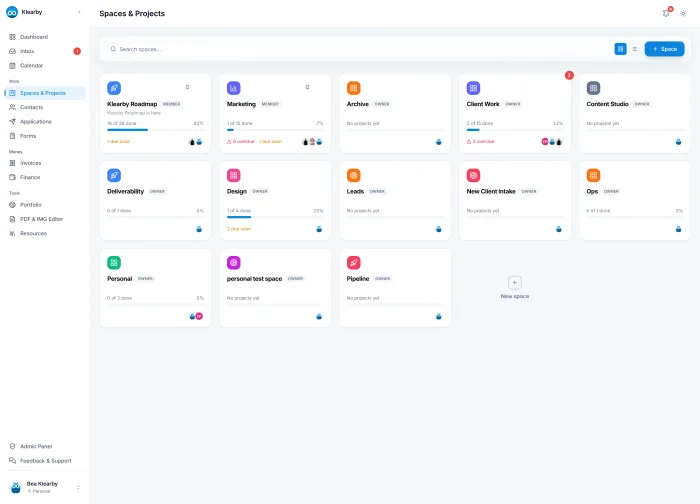
Klearby's value is not that it has invoices or projects. Plenty of tools do. It is that clients, invoices, projects, forms and finances share the same data, so a new client shows up everywhere at once and nothing gets re-typed.
Automate the chores people hate
Recurring invoices and payment reminders run on scheduled functions, so chasing unpaid invoices stops being a weekly task. That one feature saves more time than most dashboards.
Meet people in the tools they already use
Google Calendar and Gmail connect through OAuth, so events and invoices live where clients already work instead of asking them to learn something new.
Build permissions in from day one
Agencies share one workspace with roles and per-feature access, enforced by the database itself with row-level security. Adding that later is far harder than designing for it at the start.
Case study: Klearby
Invoicing, projects, calendar, forms and finance for freelancers, built solo with AI-assisted development.
Read itHow to start without building a whole platform
- Pick the single workflow that costs your team the most hours each week.
- Map it step by step, including the workarounds.
- Mock it up and walk through it with the people who will use it.
- Build that one workflow, connect it to the tools you are keeping and ship it.
- Only then decide what to bring in next.
Written by Carlos Borlaza
Remote virtual assistant, executive assistant and automation specialist with 9+ years in operations. I build the systems I write about. See how I work as your ai web developer.