From Spreadsheets to an App: Building a Field Technician App Crews Use Every Day
By Carlos Borlaza · · 7 min read
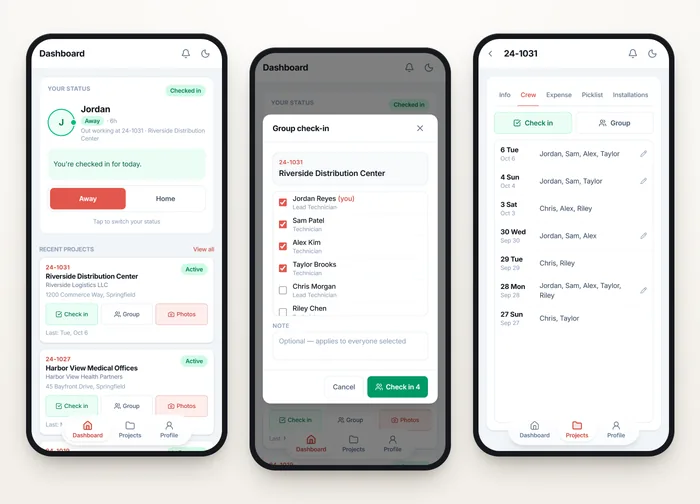
A low-voltage and security integration company ran its field crews on a set of AppSheet tools built on Google Sheets. They worked, until they did not: slow on a job site, hard to use with gloves on and a weak signal, and split across separate apps. Installs, check-ins and parts pickups were tracked in different places, so the office pieced the day together by hand.
"Our whole field operation used to live in Google Sheets. Carlos turned it into an app our office team and on-site techs actually use every day."
The goal: one app, sized for the job site
The brief was one fast app the crew installs on their phone, built on the same API and database as the office system. Every job's equipment list, crew, parts, expenses, photos and reports would sit under one project, sized for thumbs on a phone and laid out as tables on an iPad or desktop.
Mock-ups before code
Before any build, I made clickable phone-sized mock-ups and reviewed them with the operations lead. Features changed shape while change was still cheap. The installations table on wider screens is laid out the way the operations lead sketched it. The backend and office app were built by a collaborator on the same API.
What the crews got
Check-ins and crew
One-tap check-in with an optional note and location. Leads can check a whole crew in at once from a roster, and the Crew tab shows who was on site each day.
Installation tracking
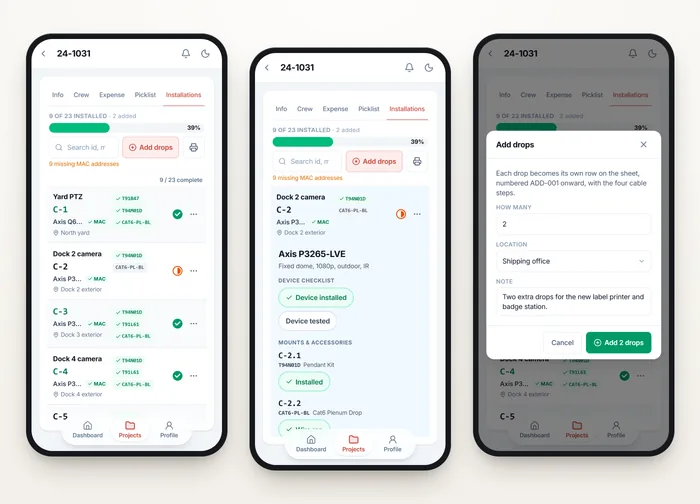
The job's equipment list from the estimating system becomes a checklist of every camera, reader, access point and cable run, with its mounts. Ticking a device complete also completes its mounts and cables, and crews can add drops they find on site, named the way they say them.
Parts, expenses, lifts and photos
Parts to collect are grouped by purchase order, with the vendor branch as a maps link and a tap-to-dial phone. Expenses are logged against the job. Rented lifts carry a running day count from the server, and photos upload several at a time, tagged with where they were taken.
PDF reports in one tap
The full installations sheet or the picklist builds as a PDF right in the browser, with repeated headings, page numbers and no row split across two pages. On an iPad it opens the share sheet, which is how iOS saves a file.
Engineering for a weak signal
A job site is not an office. Connections drop mid-tap, and a technician who sees a spinner will tap again. Every new record carries a request ID kept across retries, so tapping twice never creates a duplicate. An edit that clashes with a colleague's refreshes instead of overwriting it.
The phone never keeps its own count. Day counts, completion totals and permissions all come from the API, and the app refetches when it regains focus, after every write and on a timer.
Around 660 tests, each one proven
The app has around 660 automated tests. Each guard was broken on purpose to confirm a test fails for it, so the tests prove behaviour instead of passing regardless. That matters more with AI-assisted development, where code arrives fast and needs a safety net that actually catches mistakes.
Lessons for any team leaving spreadsheets
- Design for the hardest conditions your users face, not the office.
- Keep one source of truth. The field app and office app share one API and database.
- Let the people doing the work shape the screens before anything is built.
- Make the server responsible for the numbers, so every device agrees.
Case study: Field Technician App
Check-ins, install checklists, parts pickup, lifts, photos and PDF reports for a security integrator's crews.
Read itWritten by Carlos Borlaza
Remote virtual assistant, executive assistant and automation specialist with 9+ years in operations. I build the systems I write about. See how I work as your ai web developer.